Printable GLP-1 shot and side effect log
 PenPal Editorial Team
Short answer: Download two free, black-and-white PDFs below. The shot and site log has one row per injection and a body map for tracking your rotation. The side effect and meal log has a weekly symptom diary and a protein, fiber and water tally. Both are blank forms for your own records, not medical instructions.
Download the free PDFs
Both sheets are free to print and share. They print in black and white on US Letter or A4 paper. Each one is two pages and has no sign-up, no email gate and no ads.
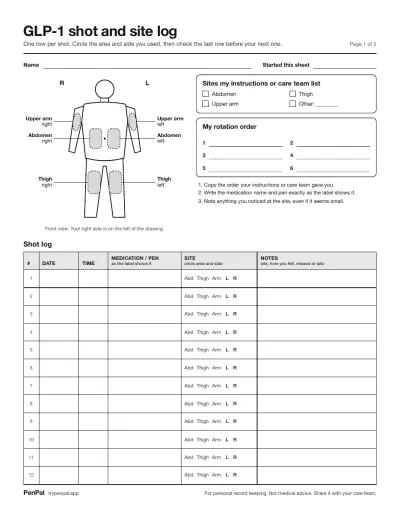
Body map, rotation order, 29 shot rows, questions box. PDF, 2 pages, 149 KB.
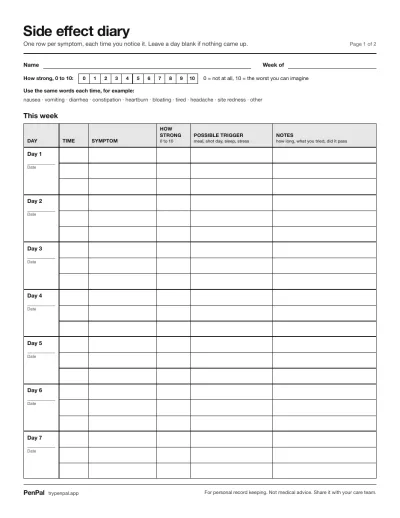
Weekly symptom diary, protein, fiber and water tally. PDF, 2 pages, 141 KB.
What’s on the shot and site log
The shot and site log is a place to write down each injection: the date, the time, the medication and pen, and the body area and side you used. Page one adds a simple body map so you can see your rotation at a glance.
- Body map: a front-view outline with the abdomen, thighs and upper arms marked on both sides. Your right side is on the left of the drawing, as if you were facing someone.
- Sites my instructions or care team list: tick boxes for abdomen, thigh, upper arm and “other.” Tick only the areas your medication’s instructions or your care team name.
- My rotation order: six numbered lines. Copy the order you were given, so you never have to work it out again.
- Shot table: 29 rows with date, time, medication / pen, site and notes. In the site column you just circle “Abd,” “Thigh” or “Arm” and “L” or “R.”
- Questions for my care team: a few lines on page two for things to bring up at your next visit.
Why rotation is worth writing down: MedlinePlus says to use a different site for each semaglutide injection, and to rotate sites with each tirzepatide dose. With a weekly shot, last week’s spot is easy to forget. Our injection site rotation guide explains what to record in more detail.
What’s on the side effect and meal log
The side effect and meal log covers one week. Page one is a diary for any symptom you notice, rated from 0 to 10. Page two is a daily tally of protein, fiber and water, with room for your own goals and notes.
- 0 to 10 scale: 0 means not at all, 10 means the worst you can imagine. One shared scale makes a week easy to compare.
- Symptom words: a short list of example words, such as nausea, constipation or tired. Using the same word each time makes patterns easier to spot.
- Week table: three rows per day for time, symptom, how strong, possible trigger and notes.
- Protein, fiber and water tally: grams of protein per meal and a daily total, a fiber total, and 12 circles to tick, one per glass or bottle of water.
- Goals: blank lines for daily protein, fiber and water goals. The sheet gives no numbers on purpose. Use the goals from your care team or app, or leave them empty.
- Patterns and questions: two boxes for what you noticed this week and what to ask.
Nausea, diarrhea, vomiting and constipation are among the side effects MedlinePlus lists for both semaglutide and tirzepatide. A dated record helps you describe them clearly instead of from memory. For what else to note, see our GLP-1 side effect diary guide and how to track protein and fiber.
How to fill them in
Write each entry the same day, in short words, and fill in every column you can. The goal is a record someone else can read quickly. This is about keeping notes, not about how to inject or treat anything: follow your prescription and your medication’s instructions for that.
Here is what two made-up rows could look like. The medication name is a placeholder.
| Date | Time | Medication / pen | Site | Notes |
|---|---|---|---|---|
| Mon 3/2 | 8:10 pm | “Med A,” pen 1 | Abd, L | Small bruise next day |
| Mon 3/9 | 7:45 pm | “Med A,” pen 1 | Abd, R | Nothing noticed |
A few habits make the sheets more useful:
- Copy the label. Write the medication name and pen as the label shows it, so there is no guessing later.
- Check the last row first. Before your next shot, read the previous site and your rotation order.
- Log late or missed shots as they happened. Write the real date and time and a note. Ask your prescriber what to do; the sheet only records it.
- Rate symptoms when you notice them. A number written in the moment is more accurate than one remembered days later.
- Note possible triggers, not causes. “Big lunch” or “shot day” is a clue for you and your clinician to look at together.
- Use “0” on good days. A row that says nothing bothered you is useful information too.
Bring both sheets to appointments. If you want a one-page summary as well, our guide to a GLP-1 progress report for your doctor shows what clinicians tend to find useful.
Printing tips
Print the PDFs at actual size on US Letter paper, or choose “Fit to page” on A4. Both sheets are black and white, so any home or library printer works.
- Print several copies. The shot log holds 29 entries; the side effect log holds one week.
- Print double-sided if you like: page two of each sheet continues page one.
- Keep them in one folder with your medication paperwork, and write the start date on each sheet.
- Use a pen, not a pencil, so the record stays readable after months in a folder.
Why some people prefer paper
Paper is simple: nothing to install, no battery, no account. Some people like writing things by hand, and a sheet on the fridge is hard to ignore.
- It’s private by default. Your notes stay on the page in your home.
- It’s easy to hand over. A clinician can read a printed sheet in seconds.
- It works for everyone. A family member or caregiver can fill it in too.
- It’s a fresh start. A blank week can feel easier than an app full of history.
When an app is easier
An app is easier when you want reminders, totals done for you, and a history you can search without flipping pages. Paper works well for a few weeks; an app helps when the log runs for months.
Paper can’t remind you, add up your protein or show a trend. Sheets get lost, and handwriting fades. If that sounds familiar, PenPal does the same record-keeping on your iPhone. With the GLP-1 shot tracker, you tap the site on a body map when you log a shot, and PenPal remembers where each one went and suggests the next site. Side effects are a quick check-in rated mild, moderate or severe in the side effect tracker. Meals, protein, fiber and water add up on their own. When it’s time for an appointment, PenPal builds a doctor-ready PDF report. Always follow the instructions that came with your medication. For more on the trade-offs, read how to choose a GLP-1 tracker app or the GLP-1 medication tracker guide.
Sources
These printables and this guide are for personal record keeping and don’t replace individual medical advice. Follow your prescription and talk to your clinician about your treatment. Ozempic®, Wegovy®, Mounjaro® and Zepbound® are trademarks of their owners; PenPal is not affiliated with them.