How to make a GLP-1 progress report for your doctor
 PenPal Editorial Team
Short answer: A good progress report is a short summary of what actually happened between appointments: the doses you logged, your weight trend, any symptoms with their timing, a few notes on meals and activity, and the questions you want answered. Keep it factual and leave the conclusions to the conversation with your clinician.
Why does a summary help?
Appointments are short, and scrolling through weeks of notes on your phone eats into them. A one-page summary lets your clinician see the pattern first and ask about the details that matter. MedlinePlus suggests going in with a list of your medicines, a description of any symptoms and the questions you want to ask, so nothing important is forgotten in the moment.
A report also helps you. Putting the weeks side by side makes it easier to notice what you want to bring up, like a symptom that keeps showing up on the same day after a dose.
What should a GLP-1 progress report include?
Include the date range, your medication and doses as logged, your weight trend, your symptoms, short notes on food, fluids and activity, other medicines, and your questions. If your log is missing one of these, leave it out rather than filling it in from memory.
- Date range: usually the time since your last appointment.
- Medication: the product name and each dose exactly as your prescription label reads, with dates. Include late or missed doses as they happened.
- Weight: the trend over the period rather than one day’s number.
- Symptoms: what you felt, when it started, how strong it was and how long it lasted.
- Food and fluids: a short note on meals, protein, fiber and water if they’re part of your plan.
- Activity: steps or workouts, if you track them.
- Other medicines: vitamins, supplements and anything new since last time.
- Questions: the things you want to leave the appointment knowing.
If you keep your entries in one place, a report is mostly copying. Our GLP-1 medication tracker guide lists what to record for each dose, so the facts are ready when you need them.
What does a one-page report look like?
A one-page report is a short table with one row per topic and a plain fact in each row. Here is an example for a six-week period. The names and numbers are made up. Write your own dose exactly as your label shows it.
| Section | Example entry |
|---|---|
| Period | September 23 to November 4 (6 weeks) |
| Medication | Product name, dose as on label, weekly on Mondays. 6 doses logged; 1 taken a day late (Tuesday, October 13). |
| Weight | Trend down over the period; 5 weigh-ins, same scale, before breakfast. |
| Symptoms | Nausea on 4 days, mild, usually 1 to 2 days after a dose. Tired on 3 evenings. |
| Food and water | Protein at most meals; smaller portions at dinner. Water logged most days. |
| Activity | Walking 4 days a week, from phone step counts. |
| Other medicines | Started a daily vitamin D supplement on October 1. |
| Questions | 1. Is the nausea pattern worth watching? 2. What should I track before next time? |
Notice that every row is something you can point to in your log. There are no guesses about causes and no grades for the weeks.
How do you build the report step by step?
Set aside about 15 minutes a day or two before the visit. Work from your log, top to bottom, and stop when the page is full. The goal is a page your clinician can read in a minute or two.
- Pick the dates. Start the day after your last appointment and end today.
- Count the doses. List each one with its date, and mark any that were late or missed.
- Read the weight trend. Write the first and latest weigh-in and the general direction.
- Group the symptoms. For each one, note how many days, how strong at worst, and any timing you noticed.
- Add a line each for food, water and activity, only if they’re part of your plan.
- List other medicines, including vitamins and supplements.
- Write your top three questions at the bottom, where they’re easy to find.
Print it or keep it on your phone, whichever you’ll actually have with you. If you keep a symptom diary, bring it too. Our guide on how to track GLP-1 side effects in a diary shows what that looks like.
How do you keep a report factual?
Write down observations, not verdicts. “Nausea on two afternoons, mild, after larger meals” gives your clinician more to work with than “the dose is too high.” If a number in your report is an estimate, such as an app’s calorie estimate for a meal or an estimated medication level, label it as an estimate.
| Instead of a verdict | Write the observation |
|---|---|
| “The dose is too strong.” | “Nausea on 4 days, mild, 1 to 2 days after each dose.” |
| “I’m eating badly.” | “Skipped lunch on 3 workdays; ate a larger dinner those days.” |
| “It stopped working.” | “Weight about the same for the last 3 weigh-ins.” |
| “I was bad this month.” | “1 dose a day late; logged meals on about half the days.” |
Resist tidying the record so it looks better. A missed dose or a rough week is exactly the kind of detail that helps your care team understand the rest of the page.
Which questions are worth bringing?
Bring the questions you most want answered, written down and in order of importance. Three is a good number for a short visit. Your questions will be your own, but these are common starting points:
- Is what I’ve been feeling expected, and when should I contact you about it?
- What should I do if I miss or delay a dose?
- Is there anything you’d like me to track more closely before next time?
- Are there goals for food, fluids or activity you’d like me to aim for?
AHRQ’s Questions Are the Answer has more ideas for preparing questions before a medical appointment.
What should you do after the appointment?
Write the answers down the same day, in the same place as your log, so they’re there the next time a question comes up. Note anything your clinician asked you to track, and start your next report period from this date.
If your clinician changed anything in your plan, record it in your log with the date, in their words. Then your next report starts with a clear before and after, and you won’t have to remember which week it changed.
How PenPal builds the report
PenPal creates a PDF progress report for the dates you choose, with your doses, weight, side effects, nutrition, water and activity. You decide whether to share it, and with whom. The report organizes what you logged; it doesn’t interpret it or suggest treatment changes. See how the progress report works.
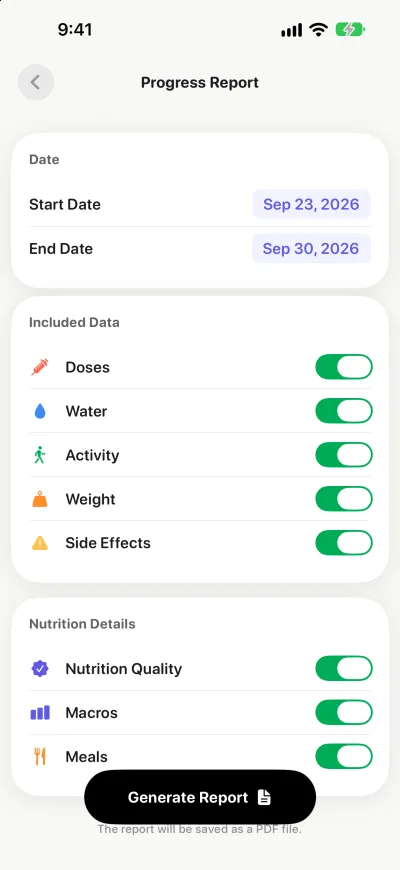
The first page is a summary: weeks on treatment, doses logged, the longest gap between doses, recent injection sites, your weight trend, a side effect table with how many days and how strong, and daily averages for food, water and activity. Later pages chart daily trends and list the full dose, daily and meal logs. You can add your name to the report; it stays on your device.
If you’re still comparing apps, our guide to choosing a tracker has a checklist.
Sources
- MedlinePlus: Talking with your doctor
- MedlinePlus: Health checkup
- AHRQ: Questions Are the Answer
- MedlinePlus: Semaglutide injection
This guide is educational and doesn’t replace individual medical advice. Follow your prescription and talk to your clinician about your treatment.