How to choose a GLP-1 tracker app, and how they work
 PenPal Editorial Team
Short answer: A GLP-1 tracking app is a structured diary. You log your prescribed doses, injection sites, symptoms, meals and weight, and the app organizes them into reminders, charts and reports. Some apps also draw an estimated medication level from the doses you log. None of this replaces your prescription or your clinician’s advice.
What do GLP-1 tracking apps record?
Most GLP-1 trackers are built around the dose. You pick your medication and schedule, then log each dose with the amount, the time and, for injections, the site. Around that, apps add the things people on these medicines often want to keep an eye on: symptoms, meals, water, weight and activity.
| Part | What it records | What to check |
|---|---|---|
| Dose log | Medication, amount, date, time, note | Units match your label, with no conversions |
| Injection sites | Where each shot went | Easy to see your recent sites at a glance |
| Symptoms | What you felt, when and how strongly | Quick to log on a day you feel rough |
| Food | Meals, protein, fiber, calories | Estimates you can edit |
| Body and activity | Weight, water, steps, workouts | Can it read from Apple Health? |
| Reports | A summary for a date range | You choose the dates and what goes in |
Not sure which of these you need? Our GLP-1 medication tracker guide explains what to record for each dose and what to log in between.
How do the pieces fit together?
The real value of an app is one shared timeline. When a symptom sits next to the dose date and the day’s meals, a pattern is far easier to see than when you piece it together from memory or three different notes.
Here is how that usually works day to day:
- Reminders nudge you before a scheduled dose, based on the schedule you entered.
- Logging takes a few taps: the dose, then a symptom or a meal when something is worth noting.
- Imports fill in what your phone already knows. On iPhone, some apps read steps, weight or water from Apple Health, so there’s less to type.
- Charts turn weeks of entries into trends you can scan, such as weight over time or how often a symptom showed up.
- Reports pull a date range into one document you can bring to an appointment.
What do the estimates mean?
An estimated medication level is a curve calculated from the doses and times you log and published values for the medicine, such as its half-life. It is not a lab measurement of what’s in your body, and it can’t account for everything about you.
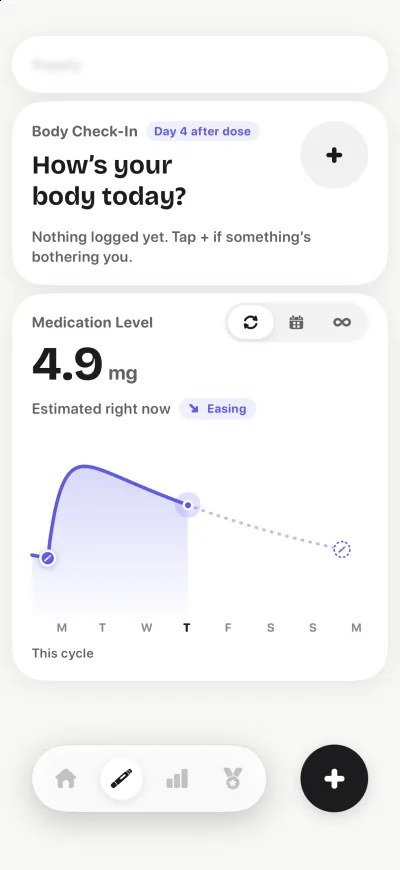
A good app labels this number as an estimate every time it appears. Use it to spot your own patterns, for example when food noise tends to come back in your week. Never use it to decide on a dose.
The same goes for AI meal analysis. A photo-based estimate of calories, protein or fiber is a convenience, and it can be wrong. A good app shows you the estimate and lets you correct it.
What should a tracking app not do?
A tracker records and organizes your information. It shouldn’t tell you which dose to take, when to change it, or whether a symptom is a side effect. If an app’s suggestions sound like dosing instructions, treat that as a red flag and check with your prescriber or pharmacist.
The FDA publishes guidance on which health software functions it regulates as medical devices. An app that only helps you record and review your own information is doing a different job from software that diagnoses or recommends treatment. Watch for these red flags:
- It suggests a dose, or a change to your dose.
- It converts your dose between units, such as mg and units, instead of letting you enter it as your label reads.
- It tells you a symptom is “normal” or “nothing to worry about”.
- It shows an estimated level without calling it an estimate.
- It promises a result, such as a set amount of weight loss.
How do you choose a GLP-1 tracker app?
Choose the app that fits your medication exactly, logs the things you care about in a few taps, explains how it handles your data, and makes you want to open it again tomorrow. Features matter less than whether you’ll keep using it. To see real apps side by side, read our comparison of the best GLP-1 tracker apps for iPhone.
- Your medication and schedule: it supports your product, your schedule and your units exactly as your label reads, without converting anything.
- Injection sites: it remembers where each shot went if you inject.
- Symptoms: it lets you record what you felt, when and how strongly.
- Food: it tracks the nutrients you care about, such as protein and fiber, and lets you edit estimates.
- Reports: it can summarize a date range you choose for an appointment.
- Privacy: it explains what it collects, says whether health data is sold or used for ads, and lets you delete your account.
- Tone: it keeps you logging without guilt-tripping you on a hard day.
MedlinePlus’ guide to evaluating health information is a useful lens for any app’s claims: look for who is behind it, where the information comes from, and whether it’s trying to sell you something.
What privacy questions should you ask?
Before you log health details, find out what the app collects, who it shares data with, and how to delete it. On the App Store, each app’s page includes privacy details that the developer must provide, so you can check before you download.
- Is my health data sold, or used for advertising?
- Does health data from Apple Health stay on my phone, or is it uploaded?
- Can I use the app without an account, or delete my account from inside the app?
- If I make a report, does it stay with me until I choose to share it?
If the privacy policy doesn’t answer these in plain words, that’s an answer too.
How can you test an app before you commit?
Give a new app one normal week. Log your real routine, then make a test report at the end. By then you’ll know whether logging feels quick, whether the app gets your medication right, and whether you like opening it.
- Set up your medication and schedule, and check the units match your label.
- Log your next dose, including the site if you inject.
- Log one symptom and one meal, and edit an estimate to see how easy it is.
- Turn on any Apple Health imports you want and check the numbers look right.
- At the end of the week, create a report and read it as your clinician would.
- Find the account deletion option, so you know where it is.
Where PenPal fits
PenPal is a GLP-1 tracker app for iPhone. It keeps your doses and reminders, an injection-site body map, an estimated medication level, protein and fiber, side effects, weight and a PDF progress report in one place, with a penguin pal that never scolds. It doesn’t diagnose, prescribe or adjust doses, and your health data is never sold or used for advertising.
Each part has its own page if you want the details:
- The GLP-1 shot tracker logs every dose and site, with reminders and the level estimate.
- The side effect tracker records what you felt and how strongly.
- The protein and fiber tracker estimates meals from a photo or a short description, and you can edit every number.
- The PDF progress report sums up the dates you choose for your next appointment.
Sources
- FDA: Device software functions including mobile medical applications
- MedlinePlus: Evaluating health information
- NIDDK: Prescription medications to treat overweight and obesity
- Apple: App privacy details on the App Store
This guide is educational and doesn’t replace individual medical advice. Follow your prescription and talk to your clinician about your treatment.