A GLP-1 progress report, ready for your appointment.
Pick the dates and PenPal turns what you logged into a PDF: doses, weight, side effects, nutrition, water and activity.
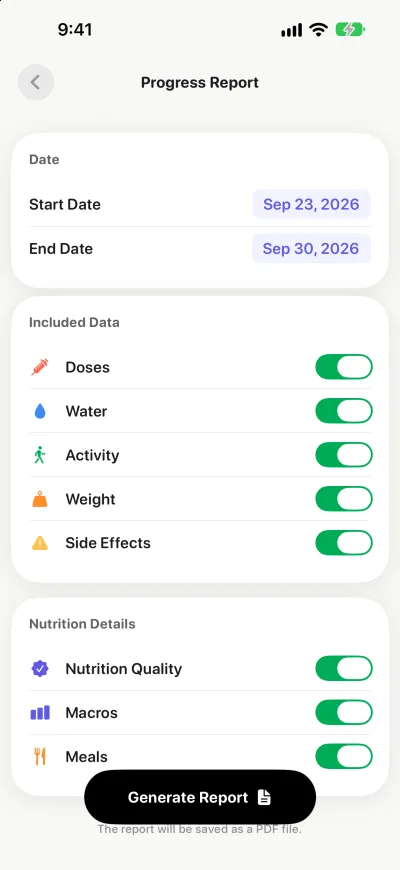
In short: PenPal creates a PDF progress report for the dates you choose, with your doses, weight, side effects, nutrition, water and activity. It organizes what you logged so your clinician can scan it quickly. You decide whether to share it, and with whom.
What is a GLP-1 progress report?
A GLP-1 progress report is a short summary of what you logged between two appointments: your doses, weight trend, side effects, meals, water and activity. Your doctor can scan it in a few minutes instead of relying on memory. PenPal builds it as a PDF from your own logs. It organizes the facts; it doesn’t interpret them.
The report is only as good as the log behind it. Read the GLP-1 medication tracker guide for what to record along the way, and see how the side effect tracker fills the side effects page.
Pick the dates
Usually that’s the time since your last appointment. Choose what to include, and PenPal builds the PDF, ready for your appointment.
What’s in the report
- Doses: each logged dose, as your label reads.
- Weight: your trend over the period.
- Side effects: what you logged and how strong it felt.
- Nutrition: a summary of the meals you logged.
- Water and activity: what you logged for the period.
You decide who sees it
The report stays with you until you share it. Your health data is never sold or used for advertising, and you can delete your account from inside the app whenever you like.
Make the most of it
Bring your questions along with the report. For what makes a summary useful, read how to make a GLP-1 progress report for your doctor. PenPal organizes what you logged; it doesn’t interpret it or suggest treatment changes.
Read more
- How to make a GLP-1 progress report for your doctor
- How to track GLP-1 side effects in a diary
- What is a GLP-1 medication tracker?
- GLP-1 side effect tracker
- PenPal FAQ: reports and privacy
PenPal is a tracking companion, not medical advice. It doesn’t diagnose, prescribe or adjust doses. Follow your prescription and talk to your clinician about your treatment.